D365 SCM. Deprecation of inventory transactions to track on-hand inventory in internal warehouse operations.

As you probably know, approximately in one year after the release of version 10.0.41, support for inventory transactions support for internal warehouse operations will be removed and all customers will be required to move to warehouse-specific inventory transactions for tracking on-hand inventory for internal warehouse operations.

It seems that the inventory transaction scenarios will be deprecated in version 10.0.45 or 10.0.46. There is a chance that, in one of the next versions (10.0.47 or higher), the application code related to inventory transactions for internal warehouse operations can be removed. 
If you still use inventory transactions for internal warehouse operations you have time for switching to the warehouse-specific inventory transactions feature. Don’t waste time. :)

Update: Microsoft will deprecate in version 10.0.49 the flighting and code that allows you to enable or disable warehouse inventory transactions in WHS parameters

Changes to "Found" cache type in version 10.0.44

It seems that Microsoft will release a fix for a cache performance in version 10.0.44. (https://fix.lcs.dynamics.com/Issue/Details/?bugId=976894&dbType=3)

Based on the description of the fix, currently, any insert operation is flushing everything from the found cache, across all AOSes. When a record is inserted into another AOS, then the cache is flushed. In fact, it means that each AOS has to recache the data.

As far as I know, today any update/insert/delete triggers an update in SysCacheFlush, forcing other AOSes to flush whatever data they have cached. 

I guess, the fix is to stop flushing for inserts on Found cached tables. Therefore, an insert into a table where found data is cached will not require any cache invalidation (flushing).

I think, the fix can resolve the issue, when the data should be cached, but the kernel is performing queries towards the database, while the expectation is that the data should be fetched from cache. 
In addition, the fix can bring performance value, since there are some tables in the system that use the "found" cache type, which are used most often, for example - SalesTable, SalesLine, PurchTable, PurchLine.

Tier-1(CHE) and Unified Developer Experience (UDE) environments build error: Another build is in progress.

In some cases you may face an issue with a model or project build in a Tier-1 environment.The error can be "another x++ build is currently running" or "another build is in progress". 

I guess, advice on how to solve this problem can be easily found on the Internet. For example, you can restart your virtual machine or kill the build process (xppcAgent) manually and try again. 

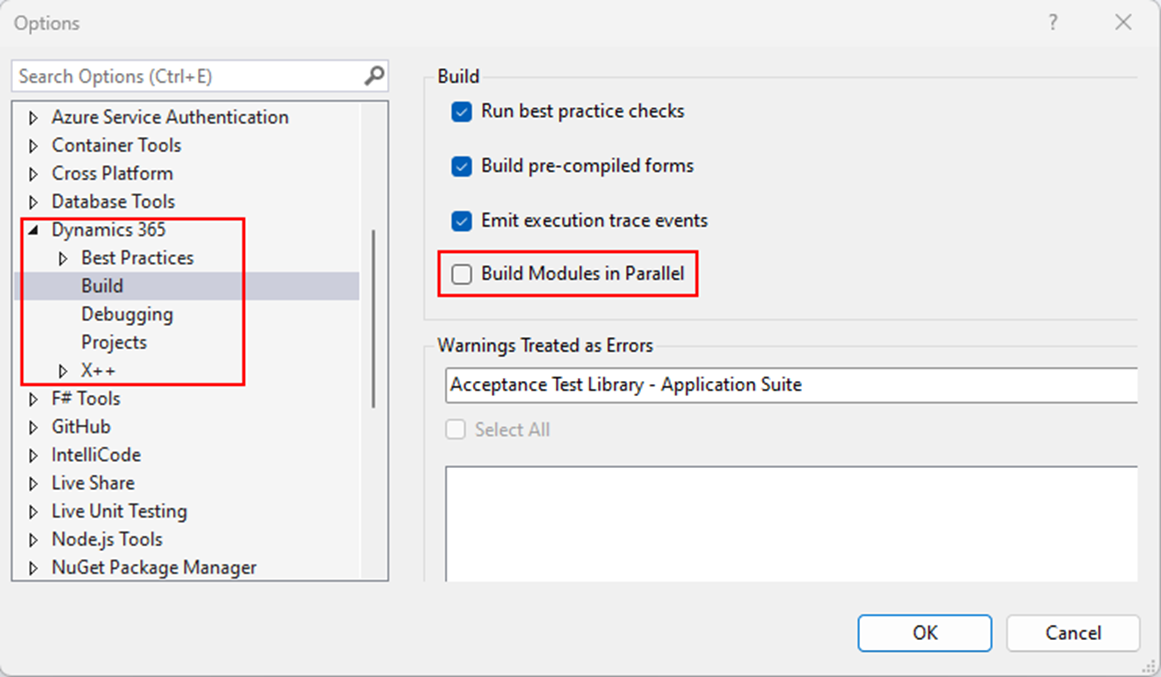
I believe it would be great to know the reason for this issue. In Visual Studio 2022, there is a setting called "Build Modules in Parallel". If it is enabled, you might constantly face the issue mentioned above.

So, it makes sense to check and deactivate this parameter in order to increase build stability in Tier-1 or Unified Developer Experience (UDE) environments.


D365 SCM warehouse mobile device development approach. Macros or constants.

As you might know there are a lot of controls and related macro commands in the WHS classes. It is not really convenient to search for macro commands in code, since they are not supported by the cross-reference feature.

In D365 Finance and Operations, there is an option that can help simplify the development of warehouse mobile flows and tracking using the existing commands. It is constants.

In my opinion, the best example of the mentioned option is the "ProcessGuideDataTypeNames" class. Inside the class you can find a lot of constants that are used in the mobile device flows. 

As you can see, macros are used at the class declaration level, but with a specific reference to a value in the WHSRF macro. As a result, you can use cross-references to find all the places in the code where the constants are used.

In general, constants have the following advantages over macros:
  • You can add a documentation comment to a constant but not to the value of a macro. Eventually, the language service will pick up this comment and provide a useful information to the user.
  • A constant is known by IntelliSense.
  • A constant is cross-referenced. Therefore, you can find all references for a specific constant but not for a macro.
  • A constant is subject to access modifiers. You can use the private, protected, and public modifiers. The accessibility of macros isn't rigorously defined.
  • Constant variables have scope, whereas macros don't have scope.
  • You can see the value of a constant or a read-only variable in the debugger.
  • Full control of the type for the constant.
  • You can also define constants as variables only. The compiler will maintain the invariant so that the value can't be modified.
  • A significant effect on the performance of the compiler.
Considering all the above, I would recommend you to use constants instead of macros in general, not only in WHS mobile device flow development.

Ax 2012 data upgrade in Tier-1 development environments(CHE). A parameter cannot be found that matches parameter name “TrustServerCertificate”.

When I ran data upgrade using Data Upgrade 10.0.41 package, I faced an issue:

Executing step: 3
GlobalUpdate script for service model: AOSService on machine: localhost
perform data upgrade, sync AX database and deploy SSRS report
A parameter cannot be found that matches parameter name 'TrustServerCertificate'.
The step failed.

On the Internet, I found that there might be a problem with a version of the SQL Server PowerShell module. When I installed the latest 22.x.x version I was able to resume the process. I performed the following steps:

Within a PowerShell prompt, I ran the following command: 
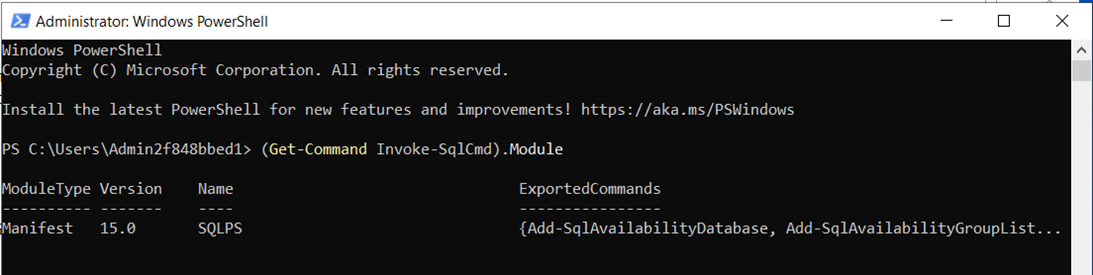
(Get-Command Invoke-SqlCmd).Module

In my case, I had 15.0 version.
In order to install the latest version I ran the command:
Install-Module -Name SqlServer -AllowClobber

When the process was completed, I ran the following PowerShell command to check the versions again: 
Get-Module -ListAvailable SqlServer, SqlPs

As a result, I saw version 22.x.x and I was able to continue with the data upgrade using the command: 
AXUpdateInstaller.exe execute -runbookid="MajorVersionDataUpgrade-runbook" -rerunstep=3

New dev tools service requirements to upgrade Tier-1 environments (CHE) to version 10.0.42 or higher.

If you are going to upgrade your developer cloud-hosted (OneBox) environments to version 10.0.42 or higher you should keep in mind that it is impossible without Visual Studio 2022 components.

If there are no Visual Studio 2022 components in your environment during the upgrade, you will see an error:

Executing step: 29
Update script for service model: DevToolsService on machine: localhost update DevTools service
The Dynamics 365 F&O Development Tools extension folder for Visual Studio was not found
The step failed.

In my opinion, there are 2 ways to solve the issue:

  • Install Visual Studio 2022 on the environment
  • Deploy a new environment with version 10.0.42 on the LCS, or if you use local machines, you can create one from the VHD with version 10.0.39 and upgrade it to 10.0.42.
You can find an official announcement here.

How to run batch tasks using the SysOperation framework

Overview

As you may know, the system has batch tasks functionality. It can be used to create a chain of operations if you want to set an order of tasks execution according to certain criteria.

Issue description


When you create a new batch tasks you have to specify the "Class name" field. If you know the class name in advance you can put it directly and not wait for the lookup list. Theoretically not all classes are supposed to be used with the mentioned feature. In this casse, the following warning message will appear: 
"The specified class is not fully designed for use in the Batch job form. Execution might provide unexpected results."

If you ignore this message and try to define the class parameters you will see the error: 
"Access denied: Class name"

If we use the "RunBaseBatch" framework it is required to override the method "canGoBatchJournal" and set its return value to "true".

If you use the new SysOperation framework it is required to decorate the controlled class with the 
"[SysOperationJournaledParametersAttribute(true)]". 

[SysOperationJournaledParameters(true)]

class WHSReleaseOutboundShipmentOrderToWarehouseController

If you add this command the issue with the warning message "The specified class is not fully designed for use in the Batch job form. Execution might provide unexpected results." will be solved.

But if you try to set the parameters you will still see the error: "Access denied: Class name".

In order to solve it, it is requerd to add to the "new" method a reference to the service class and method. You can take a look at the "WHSReleaseOutboundShipmentOrderToWarehouseController" class to get an idea of the pattern.

void new(

    IdentifierName _className  = '',
    IdentifierName _methodName = '',
    SysOperationExecutionMode _executionMode = SysOperationExecutionMode::Synchronous)
{
    IdentifierName parmClassName    = _className != '' ? _className :                 
            classStr(WHSReleaseOutboundShipmentOrderToWarehouseService);

    IdentifierName parmMethodName = _methodName != '' ? _methodName : 
        methodStr(WHSReleaseOutboundShipmentOrderToWarehouseService, 
            autoReleaseOutboundShipmentOrders);

    super(parmClassName, parmMethodName, _executionMode);

    this.parmDialogCaption(
        WHSReleaseOutboundShipmentOrderToWarehouseController::description());
}

When the "new" method is executed, the framework looks at the "run" method and determines the contract based on the input parameters. The call to "startOperation" method causes the system to build the user interface and execute code based on the user’s actions. A dialog is created using data types specified in data contract member methods. This explains why the new method requires class and method names. The third parameter specifies the execution mode, which takes effect if we programmatically execute the controller. Synchronous execution runs in line with the current process unless the user chooses to run it in the background.

So the reason for the error "Access denied: Class name" was that the service class names and method names were not set by default in the "new" method. As a result, the default UI builder class did not have a reference to the contract class, so parameters could not be set for batch tasks.

In case you experience other challenges with the SysOperation batch tasks feature you can use "WHSReleaseOutboundShipmentOrderToWarehouse*" classes to guide you.
Data upgrade from AX 2012 in development environments: database collation change.

Overview

As you may know the collation of the AX 2012 database must be SQL_Latin1_General_CP1_CI_AS when you perform a data upgrade in development environments. If your database is a different collation, you have to change it. Otherwise, you will experience weird errors during the data upgrade process. I would like to share my experience with this process.

Issue description

In order to change the collation of the AX 2012 database you can follow this guide: Change the database collation for development environments. When I tried to use the command from the mentioned guide:

SqlPackage.exe /Action:Export /SourceServerName:localhost /SourceDatabaseName:MicrosoftDynamicsAX /TargetFile:"C:\Temp\MicrosoftDynamicsAX.bacpac" /Properties:CommandTimeout=1200 /Properties:VerifyFullTextDocumentTypesSupported=False

The error appeared:

*** Changes to connection setting default values were incorporated in a recent release.  More information is available at https://aka.ms/dacfx-connection
*** Error exporting database:Could not connect to database server.
A connection was successfully established with the server, but then an error occurred during the login process. 
(provider: SSL Provider, error: 0 - The certificate chain was issued by an authority that is not trusted.)
The certificate chain was issued by an authority that is not trusted
*** The settings for connection encryption or server certificate trust may lead to connection failure if the server is not properly configured.

The cause of the error is that the server may not have encryption enabled or the configured certificate may not be issued from a trusted certificate authority (such as a self-signed certificate).

In order to avoid this error, I used the following guide: SqlPackage Export parameters and properties. As a result, I modified the export command given in the guide:

SqlPackage.exe /Action:Export /SourceServerName:localhost /SourceDatabaseName:MicrosoftDynamicsAX /TargetFile:"C:\Temp\MicrosoftDynamicsAX.bacpac" /Properties:CommandTimeout=4200 /Properties:VerifyFullTextDocumentTypesSupported=False /SourceTrustServerCertificate:True

The idea is to add the "/SourceTrustServerCertificate:True" command. It requires to use TLS to encrypt the source database connection and bypass walking the certificate chain to validate trust. As a result, you change the SqlPackage command to either connect without encryption or to trust the server certificate. In addition, I extended the timeout to 4.200 seconds.

When you change the “Collation” property in the model.xml file you need to import the *.bacpac file back into the database server to create a new database. Therefore, it makes sense to apply a similar change to the export command. The idea of the changes is the same: trust the server's certificate and extend the timeout.

As a result, I modified the import command given in the guide: 

SqlPackage.exe /Action:Import /SourceFile:"C:\Temp\ MicrosoftDynamicsAX.bacpac" /TargetServerName:localhost /TargetDatabaseName:MicrosoftDynamicsAX_NewCollation /Properties:CommandTimeout=4200 /ModelFilePath:"C:\Temp\model.xml" /TargetTrustServerCertificate:True

After that, I was able to import the *.bacpac file into a new database with the SQL_Latin1_General_CP1_CI_AS collation.

Ax 2012 data upgrade on the self-service environment hosted on the Europe region (eu.lcs.dynamics.com).

When you run the DataMigrationTool.exe application a console window opens where you can specify the cloud environment type:

  • Public: [ lcs.dynamics.com ]
  • GCC: [ gov.lcs.microsoftdynamics.us ]
  • UAE: [ uae.lcs.dynamics.com ]


As you can see, there are no options to select the EU or European option for LCS geography. As a result, if your environment is hosted in the European LCS region, you will not be able to proceed with the data upgrade.

To solve this issue, you need to do the following:

    1. Edit the "DataMigrationTool.exe.config" file. It is located in the folder where you extracted 
    the Data Migration Toolkit. 

    2. You need to find the lines: 
    <add key="lcsApiEndpoint" value="https://lcsapi.lcs.dynamics.com/" />
    <add key="lcsApiEndpoint_us" value="https://lcsapi.gov.lcs.microsoftdynamics.us/" />
    <add key="lcsApiEndpoint_uae" value="https://lcsapi.uae.lcs.dynamics.com/" />

    3. Modify the line: 
    <add key="lcsApiEndpoint" value="https://lcsapi.lcs.dynamics.com/" />
    It should be like this:
    <add key="lcsApiEndpoint" value="https://lcsapi.eu.lcs.dynamics.com/" />

    4. Run the DataMigrationTool.exe application again and select the default option. 
    It should now point to the EU LCS geography.

As a result, you should be able to proceed with the data upgrade on the self-service environment hosted in the Europe region (https://eu.lcs.dynamics.com/).

Dynamics 365 Finance and Operations. New development features in version 10.0.40 PU64.

In version 10.0.40 PU64 new features for developers have been introduced.

First of all, it is possible to add modified objects to the current project automatically. It means no more worries about adding objects to the right project. The modified objects will be added automatically. In order to enable this feature, the "Add files to solution on save" option should be enabled.


The second feature is related to the building process. It is possible to select the label file to be built.


All label files will be compiled by default. If you would like to build only labels or speed up the building process you can use this option.

Dynamics 365 Finance and Operations. Error: The field has not been explicitly selected.

Recently, one of my colleagues encountered the error " Field has not been explicitly selected " when they tried to update a field ...